
Baby Leap: Baby Tracker, Diary
Omega Solutions, Inc.Parenting
4.4191.00 Reviews
- Version
- 1.53.5
- Installs
- 100.00K
- Age Rating
- Everyone
Screenshots


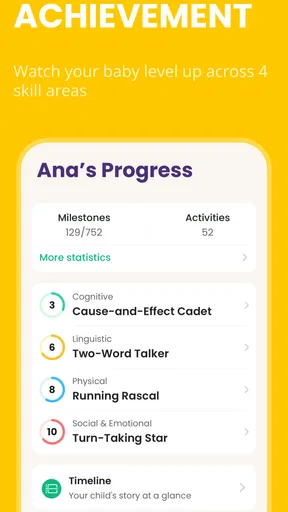
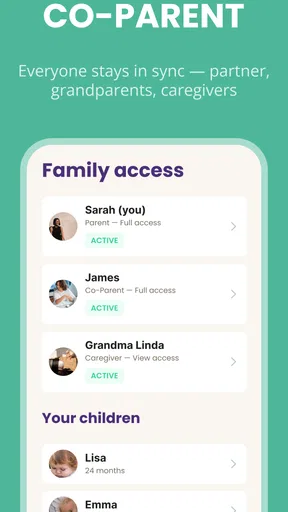
Our Review of Baby Leap: Baby Tracker, Diary
 Analysis by Appyee
I look at a baby-tracking app differently from a photo diary or a general parenting forum: it touches details about a child and can influence how a tired parent interprets development. That makes trust part of the decision, not an afterthought. Baby Leap: Milestone Tracker is a free parenting app from Omega Solutions, Inc., and its focus is helping parents follow development and keep milestone memories together. I find that combination appealing, but I would treat any app’s guidance as a prompt for questions and reflection—not as a verdict on a baby’s health or progress.
What the app is useful for—and what it cannot settle
The main appeal is having developmental information and personal notes in one place. That can be more practical than keeping a list in a notes app and searching online whenever a new behavior appears. Still, milestones are not a pass-or-fail checklist. Babies develop at different paces, and an app cannot assess a child in person. If something worries you, I would bring the concern to a pediatric professional rather than trying to resolve it through comparisons with an age-based guide.
That distinction matters most when a milestone seems late or a suggested activity does not fit your child. I would use the app to organize observations—what happened, when, and what you noticed—then discuss those details with a clinician if needed. The useful outcome is a clearer conversation, not pressure to make every entry match a schedule.
Trust begins with choices, not assumptions
Parents should be careful about what they enter into any child-focused service. Before adding personal details or photos, I recommend reviewing the app’s current permission prompts and privacy information on the device and in the relevant store. I won’t assume what information the app collects, how it is stored, or whether a particular control exists; those points should be checked directly rather than guessed from the app’s purpose.
A sensible way to begin is to share only what you need for the experience you want. You might start with the basic details needed to see age-related content and hold off on adding images or extra notes until you have decided whether the app suits your family. If you later stop using it, check the available account and data controls before removing the app; deleting an icon and managing an account are not always the same thing.
When tracking helps, and when it can add stress
For a parent who enjoys recording small changes, a milestone log can turn scattered memories into a useful record. For someone who already feels anxious about comparisons, frequent prompts or age-based expectations may have the opposite effect. I would keep the app only if it leaves you feeling better organized rather than more worried. You can also use it lightly: save a milestone that feels meaningful, read an article when a question comes up, and ignore anything that does not fit your child or your day.
It is also worth thinking about who will use the record. If another caregiver helps with the baby, agree on what you want to document and who will add it. That simple habit can prevent duplicate entries and keep notes more useful. I would avoid treating a missing entry as evidence that something did not happen; family records are helpful precisely because they are informal, not because they capture every moment.
Getting Started with Baby Leap
First things first, downloading Baby Leap: Milestone Tracker is a breeze. Available on both Android and iOS, it doesn’t take up much space, which is always a plus when you're juggling countless baby photos and videos on your phone! Once installed, setting up your profile is straightforward. You input your baby's details like birthdate, and voilà, you're ready to dive in.
Features You'll Love
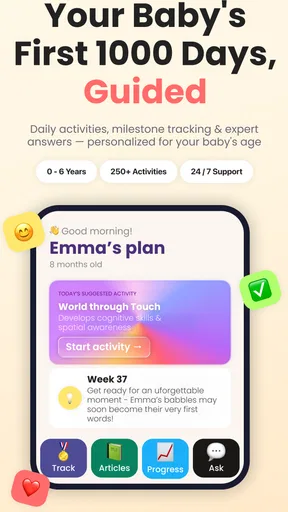
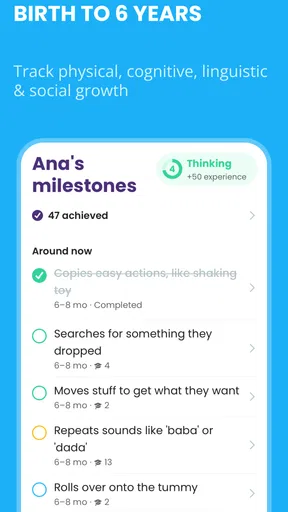
The app does a fantastic job of laying out milestones in a way that's easy to understand. It’s categorized by age, so you can quickly see what’s expected at each stage. From first smiles to first steps, Baby Leap covers it all. I appreciated how it gives a clear idea of what to expect without making you feel overwhelmed.
One feature I found super handy is the ability to log milestones. It’s almost like having a digital baby book. You can jot down notes and even add pictures, which is perfect for those moments you want to remember and share with family later.
Turning quick checks into a useful routine
For everyday use, I would avoid opening the app every time the baby does something new. A calmer workflow is to note a moment when you have a spare minute, then add a short detail later if it still feels meaningful. For example, after a weekend visit, you might record a new response or movement and add a sentence about the setting. That context can make the entry more vivid than a bare date, while keeping the task small enough to fit around feeding, naps, and everything else.
Photos can make a memory more personal, but they are also the most sensitive part of a baby record. I would choose images intentionally rather than uploading a large camera roll, and think about whether a written note is enough for a particular milestone. If you plan to show entries to relatives, decide what you are comfortable sharing before you do it. A digital baby book is most useful when it reflects your family’s boundaries as well as its memories.
One trade-off with any age-organized tracker is that the neat structure can make development look more linear than it is. A baby may show one skill early and another later, or do something only in a familiar setting. I would read the age grouping as a way to find relevant material, not as a deadline. Logging an observation without labeling it “ahead” or “behind” keeps the record descriptive and less likely to turn into a source of unnecessary comparison.
Development Insights
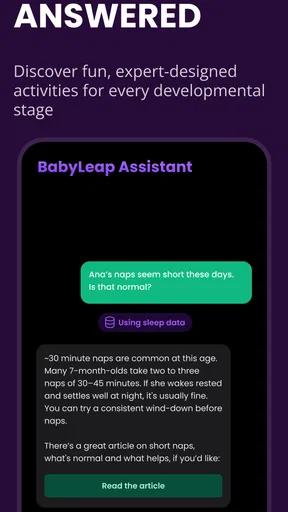
Beyond just tracking milestones, the app provides insightful articles and tips on each developmental stage. These are written in a friendly, non-judgmental tone, which I found comforting. Parenting is hard enough without feeling like you're being lectured, right?
There's also a community feature where you can connect with other parents. It's like having a virtual support group at your fingertips. You can exchange tips or just vent about those sleepless nights (we've all been there!).
Using advice and community thoughtfully
Articles can be handy when you want a starting point for understanding a stage, but I would not treat general tips as instructions tailored to your baby. A useful habit is to separate “this gives me an idea to try” from “this answers a medical concern.” The first may be a practical parenting prompt; the second calls for an appropriately qualified professional. If an article raises a question, save the question in your own words so it is easier to bring up at an appointment.
The parent community offers a different kind of value from a tracker: reassurance that other people are navigating similar routines. It can also expose you to experiences that do not match your own. I would use it for companionship and everyday perspectives, while staying selective about advice on health, feeding, or development. A confident post from another parent is still one family’s experience, not a personal assessment of your child.
That balance is especially useful during a rough night. You might read a short piece related to the stage you are dealing with, or browse other parents’ experiences for solidarity, then step away instead of scrolling until every story becomes another comparison. The community is most helpful when it makes parenting feel less isolating; it is less helpful if it becomes a stream of claims you feel obliged to follow.
Ease of Use
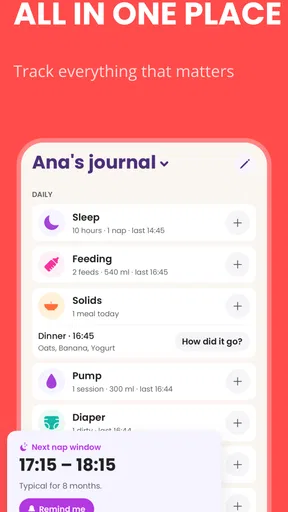
One of the things I loved most about Baby Leap is its user-friendly interface. Navigating through the app is intuitive, even when you’re sleep-deprived. The design is clean and uncluttered, focusing on what matters most: your baby’s development.
Notifications are another lifesaver. The app sends gentle reminders about upcoming milestones and articles you might find interesting. It’s a subtle nudge to keep you informed without being intrusive.
Fit, cost, and alternatives
Baby Leap has a 4.6 average from around 2.9 thousand ratings, with over 100 thousand installs. It is rated for Everyone, and the current version is 1.35.2; it requires Android 7.0 or later. The app is free to download, while in-app purchases range from about $15 to $270 per item. I would check the purchase screen carefully before committing, especially if you only want basic tracking and are not sure you will use paid options.
Compared with a paper baby book, the app is easier to carry around and can bring age-related material and saved memories into one routine. A simple notes app may be better if you want full control over the format and do not need organized milestone content or a parent community. A general parenting forum may offer broader conversation, but it is not the same as keeping a personal record. The right choice depends on whether you value this combination enough to accept another app and its prompts in your daily life.
I would recommend trying the free experience with a modest amount of information first. If you find yourself returning to the milestone guide, saving notes, and appreciating the articles, that is a good sign it fits. If you mainly want a private archive, or if reminders and age comparisons make you uneasy, a paper journal or a basic note-taking tool may feel calmer. Neither choice is less thoughtful; the goal is a record that supports your family rather than adding another obligation.
Final Thoughts
In a world where there’s an app for everything, Baby Leap: Milestone Tracker stands out as a must-have for new parents. It’s informative, easy to use, and genuinely helpful in understanding your baby's growth. While no app can replace the advice of a healthcare professional, this one certainly complements it by giving you peace of mind and a sense of community.
If you're a new parent or even a seasoned one looking for an extra hand in the digital age, give Baby Leap a try. It’s like having a little parenting coach right in your pocket, cheering you on every step of the way.
My cautious recommendation
I see this as a good fit for parents who want a guided place to follow milestones, keep a few meaningful memories, and read approachable developmental material. It is less compelling for someone who already has a record-keeping routine they like, wants a strictly private offline notebook, or prefers not to engage with community discussions and notifications. Those preferences are valid reasons to choose a simpler alternative rather than trying to make one app do everything.
My practical advice is to treat it as a companion, not an authority: use the age sections to find relevant topics, record observations in your own words, and make deliberate choices about photos, permissions, and purchases. If that approach makes the early years easier to remember without making you feel monitored or judged, Baby Leap earns a place on your phone. If it creates more pressure than clarity, stepping back is the sensible choice.
Verdict
Strengths of Baby Leap: Baby Tracker, Diary
- User-friendly interface for easy navigation.
- Comprehensive milestone tracking features.
- Customizable notifications and reminders.
- Includes expert tips and advice.
- Secure data storage and privacy controls.
Limitations of Baby Leap: Baby Tracker, Diary
- Limited features in free version.
- Occasional ads can be distracting.
- Requires internet for some features.
- Limited offline functionality.
- Some users report minor bugs.
Similar Picks in This Category
View All
Family Space
Motorola Mobility LLC.3.9

شرطة الأطفال - مكالمة وهمية
Oub Apps4.1

Findmykids: Parental Control
LETEM LTD4.6

Pregnancy + | Tracker App
Philips Electronics UK Limited4.8

Policía de niños - para padres
Kids police4.7

Pregnancy App
Amila4.9
Frequently Asked Questions
What is Baby Leap: Milestone Tracker and how does it work?
Baby Leap: Milestone Tracker is an app designed to help parents track their child's developmental milestones. It provides a comprehensive timeline of expected progress, allowing parents to record achievements and receive insights based on age-specific benchmarks. The app enhances understanding of child development by offering personalized tips and reminders.
Is Baby Leap: Milestone Tracker free to use, or are there any in-app purchases?
Baby Leap: Milestone Tracker offers a free version with basic features, but also includes premium in-app purchases. These premium options provide access to additional features such as expert advice, advanced milestone tracking, and customizable charts. Users can choose to upgrade based on their needs and preferences.
How secure is the data stored in Baby Leap: Milestone Tracker?
The app prioritizes user privacy and data security. Personal information and milestone data are encrypted and stored securely. Baby Leap employs industry-standard security measures to protect data, ensuring that only authorized users have access. Parents can have peace of mind knowing their child's information is safe.
Can I use Baby Leap: Milestone Tracker for multiple children?
Yes, Baby Leap: Milestone Tracker allows parents to track milestones for multiple children within the same account. The app provides separate profiles for each child, enabling users to monitor progress individually and receive tailored advice. This feature is particularly useful for families with more than one child in different developmental stages.
Does Baby Leap: Milestone Tracker offer any support for parents?
The app includes a robust support system for parents, offering expert tips and guidance on child development. Users can access a library of articles and videos that provide insights into each milestone. Additionally, an in-app community forum allows parents to connect and share experiences, fostering a supportive environment.
